
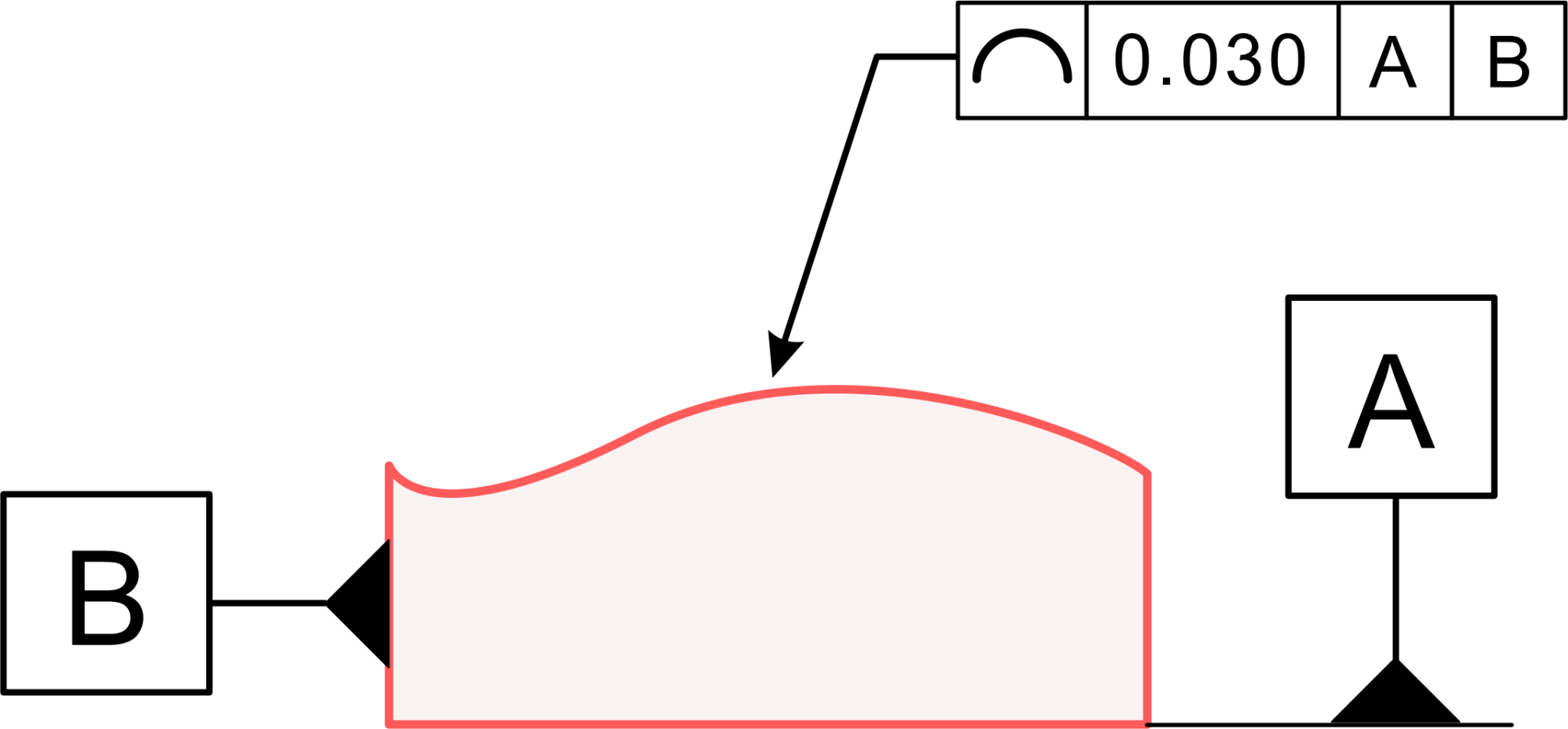
On a part whose curves and contoured edges keep shifting, how do you tell the shop floor exactly how far each slice of that shape may wander? That is the job the Profile of a Line does. It is the control engineers reach for when the shape of a single cross-section drives how a part performs, whether that slice is a straight edge, an arc, or one of the complex curves a modern part demands.
This guide walks through how it works, how its tolerance zone is built, how it differs from nearby callouts, how you measure it, and where it earns a place on a drawing.
 The Profile of a Line is a form control in GD&T, a two-dimensional callout that sets a tolerance zone for a single line element on the surface of a part.
Picture one slice, a single cross-section cut through the part. This control tells you how far that one line, on that one slice, may vary from its ideal shape.
That ideal shape is called the true profile. Think of it as the flawless version of the line drawn from the CAD model or the engineering drawings. It is pinned down with basic dimensions, and although those basic dimensions carry no tolerance of their own, they establish the exact path the line should trace. That reference path is the ideal shape every measured slice is compared against.
From there, the Profile of a Line wraps a boundary around that ideal shape. The boundary is a pair of curves that run parallel to it, and the space between them is the line tolerance zone.
Every measured point along the real surface of the finished part, taken on that one cross-section, has to sit inside the tolerance zone. The control governs the shape of a line whether that shape is straight, an arc, a circle of some radius, or a far busier curve. In short, it makes sure the line elements of a feature stay true to the drawn shape.
The Profile of a Line is a form control in GD&T, a two-dimensional callout that sets a tolerance zone for a single line element on the surface of a part.
Picture one slice, a single cross-section cut through the part. This control tells you how far that one line, on that one slice, may vary from its ideal shape.
That ideal shape is called the true profile. Think of it as the flawless version of the line drawn from the CAD model or the engineering drawings. It is pinned down with basic dimensions, and although those basic dimensions carry no tolerance of their own, they establish the exact path the line should trace. That reference path is the ideal shape every measured slice is compared against.
From there, the Profile of a Line wraps a boundary around that ideal shape. The boundary is a pair of curves that run parallel to it, and the space between them is the line tolerance zone.
Every measured point along the real surface of the finished part, taken on that one cross-section, has to sit inside the tolerance zone. The control governs the shape of a line whether that shape is straight, an arc, a circle of some radius, or a far busier curve. In short, it makes sure the line elements of a feature stay true to the drawn shape.
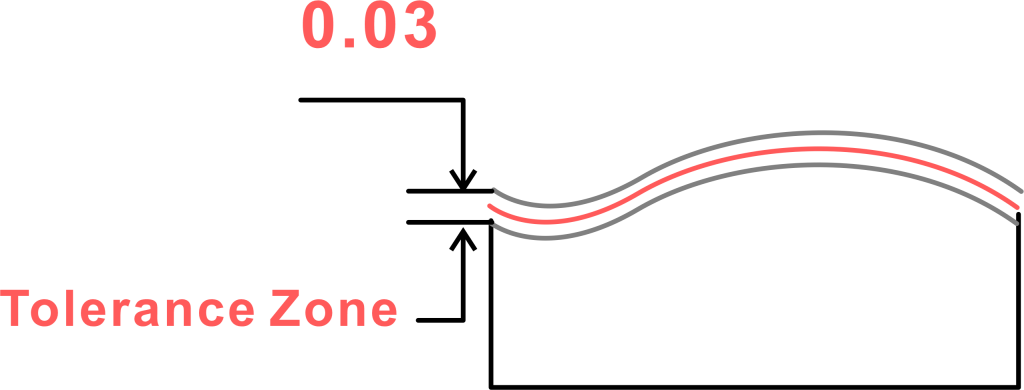 Let's unpack that tolerance zone, since it is the thing you are really policing. Its makeup is simple: two parallel lines that follow the ideal path, held apart by the tolerance value written in the feature control frame.
Picture a road with two curbs. The center line is the ideal path, the curbs are the edges of the tolerance zone, and the measured surface has to stay on the tarmac between them.
The zone copies the shape of the ideal path exactly. If that path is an arc of a set radius, the boundaries become parallel curves of the same sweep. If the geometry gets busier, the tolerance zone follows every twist without complaint, giving a lengthwise uniform band the line may vary within.
Keep one thing in mind: this control checks a line, not a whole surface. You are reading the shape at a single cross-section, so it captures shape variation section by section. To vouch for the entire surface you would repeat the check at many cross-sections. That is the headline gap between a line callout and a surface one. As a 2D control, the Profile of a Line is a strong choice wherever the shape of a slice matters more than the size of the whole part.
Let's unpack that tolerance zone, since it is the thing you are really policing. Its makeup is simple: two parallel lines that follow the ideal path, held apart by the tolerance value written in the feature control frame.
Picture a road with two curbs. The center line is the ideal path, the curbs are the edges of the tolerance zone, and the measured surface has to stay on the tarmac between them.
The zone copies the shape of the ideal path exactly. If that path is an arc of a set radius, the boundaries become parallel curves of the same sweep. If the geometry gets busier, the tolerance zone follows every twist without complaint, giving a lengthwise uniform band the line may vary within.
Keep one thing in mind: this control checks a line, not a whole surface. You are reading the shape at a single cross-section, so it captures shape variation section by section. To vouch for the entire surface you would repeat the check at many cross-sections. That is the headline gap between a line callout and a surface one. As a 2D control, the Profile of a Line is a strong choice wherever the shape of a slice matters more than the size of the whole part.
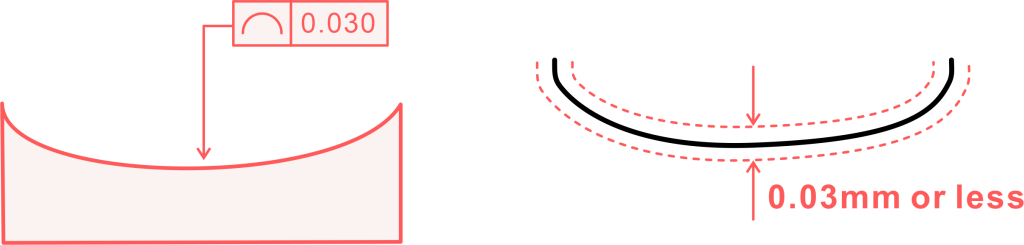 How you flag the Profile of a Line on a drawing all happens inside the feature control frame, the rectangular box that holds every part of the requirements.
You open with the line profile symbol. This symbol, an arc or half-circle, always sits in the first compartment. The moment someone reads the drawing, that symbol says a line profile requirement is applied here.
Just to the right, in the second compartment, sits the tolerance value. This figure gives the full width of the tolerance zone. Say the value reads 0.5: the two parallel lines of the boundary must then stand 0.5 mm apart. Note that the number sets the whole band, not a radius or an offset from one side.
Next you might spot a circle with a U inside it beside the tolerance. That flags an unequal bilateral zone, where the band does not split evenly around the true profile. With no such modifier, the split is assumed equal on both sides.
Then come the datums. If the frame names one or more (A, B, C, for example), the tolerance zone pins down not just the shape of the line but its orientation and location against those datums, which lock the zone in space.
With no datums called out, the callout treats the feature as pure shape: the slice may float and rotate freely, and only its shape has to fall inside the zone. A leader arrow runs from the frame to the surface being checked. One more consideration: the drawing may carry dashed lines marking the exact cross-section where the reading is taken.
How you flag the Profile of a Line on a drawing all happens inside the feature control frame, the rectangular box that holds every part of the requirements.
You open with the line profile symbol. This symbol, an arc or half-circle, always sits in the first compartment. The moment someone reads the drawing, that symbol says a line profile requirement is applied here.
Just to the right, in the second compartment, sits the tolerance value. This figure gives the full width of the tolerance zone. Say the value reads 0.5: the two parallel lines of the boundary must then stand 0.5 mm apart. Note that the number sets the whole band, not a radius or an offset from one side.
Next you might spot a circle with a U inside it beside the tolerance. That flags an unequal bilateral zone, where the band does not split evenly around the true profile. With no such modifier, the split is assumed equal on both sides.
Then come the datums. If the frame names one or more (A, B, C, for example), the tolerance zone pins down not just the shape of the line but its orientation and location against those datums, which lock the zone in space.
With no datums called out, the callout treats the feature as pure shape: the slice may float and rotate freely, and only its shape has to fall inside the zone. A leader arrow runs from the frame to the surface being checked. One more consideration: the drawing may carry dashed lines marking the exact cross-section where the reading is taken.
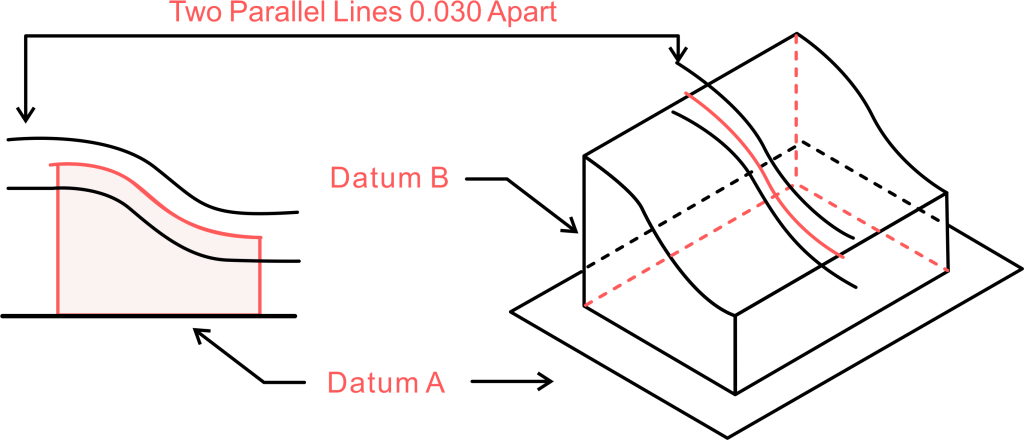 So how does a shop check parts against this spec? You have to read the shape variation the right way, and that usually calls for smarter kit, because you are matching the measured surface against a flawless ideal.
What is Profile of a Line under GD&T?
The Profile of a Line is a form control in GD&T, a two-dimensional callout that sets a tolerance zone for a single line element on the surface of a part.
Picture one slice, a single cross-section cut through the part. This control tells you how far that one line, on that one slice, may vary from its ideal shape.
That ideal shape is called the true profile. Think of it as the flawless version of the line drawn from the CAD model or the engineering drawings. It is pinned down with basic dimensions, and although those basic dimensions carry no tolerance of their own, they establish the exact path the line should trace. That reference path is the ideal shape every measured slice is compared against.
From there, the Profile of a Line wraps a boundary around that ideal shape. The boundary is a pair of curves that run parallel to it, and the space between them is the line tolerance zone.
Every measured point along the real surface of the finished part, taken on that one cross-section, has to sit inside the tolerance zone. The control governs the shape of a line whether that shape is straight, an arc, a circle of some radius, or a far busier curve. In short, it makes sure the line elements of a feature stay true to the drawn shape.
Profile of a Line Tolerance Zone
Let's unpack that tolerance zone, since it is the thing you are really policing. Its makeup is simple: two parallel lines that follow the ideal path, held apart by the tolerance value written in the feature control frame.
Picture a road with two curbs. The center line is the ideal path, the curbs are the edges of the tolerance zone, and the measured surface has to stay on the tarmac between them.
The zone copies the shape of the ideal path exactly. If that path is an arc of a set radius, the boundaries become parallel curves of the same sweep. If the geometry gets busier, the tolerance zone follows every twist without complaint, giving a lengthwise uniform band the line may vary within.
Keep one thing in mind: this control checks a line, not a whole surface. You are reading the shape at a single cross-section, so it captures shape variation section by section. To vouch for the entire surface you would repeat the check at many cross-sections. That is the headline gap between a line callout and a surface one. As a 2D control, the Profile of a Line is a strong choice wherever the shape of a slice matters more than the size of the whole part.
How to Show GD&T Profile of a Line on a Drawing
How you flag the Profile of a Line on a drawing all happens inside the feature control frame, the rectangular box that holds every part of the requirements.
You open with the line profile symbol. This symbol, an arc or half-circle, always sits in the first compartment. The moment someone reads the drawing, that symbol says a line profile requirement is applied here.
Just to the right, in the second compartment, sits the tolerance value. This figure gives the full width of the tolerance zone. Say the value reads 0.5: the two parallel lines of the boundary must then stand 0.5 mm apart. Note that the number sets the whole band, not a radius or an offset from one side.
Next you might spot a circle with a U inside it beside the tolerance. That flags an unequal bilateral zone, where the band does not split evenly around the true profile. With no such modifier, the split is assumed equal on both sides.
Then come the datums. If the frame names one or more (A, B, C, for example), the tolerance zone pins down not just the shape of the line but its orientation and location against those datums, which lock the zone in space.
With no datums called out, the callout treats the feature as pure shape: the slice may float and rotate freely, and only its shape has to fall inside the zone. A leader arrow runs from the frame to the surface being checked. One more consideration: the drawing may carry dashed lines marking the exact cross-section where the reading is taken.
How to Measure GD&T Profile of a Line
So how does a shop check parts against this spec? You have to read the shape variation the right way, and that usually calls for smarter kit, because you are matching the measured surface against a flawless ideal.